PLC foundations
- Introduction to PLCs
- Input/output modules
- Safety circuit
- PLC processors
- Numbering systems & codes
- Basic programming
PLCTRAINER · INTERACTIVE WINDOWS SOFTWARE
From your first rung to analog scaling and troubleshooting.
Work through narrated lessons and built-in simulations that show how PLC instructions affect an automated system. PLCTrainer connects ladder diagrams, I/O, timers, counters, and data handling through examples with the look and feel of RSLogix 500.
Self-paced study · About 30 hours · Offline Windows software · No subscription

WHAT THE COURSE TEACHES
CHOOSE YOUR PLCTRAINER LICENSE
Select a Student License, course-and-simulator bundle, or Site License below to see its price and add PLCTrainer to your cart. For multiple locations, request an Enterprise License quote.
Your order will be processed by our parent company, Business Industrial Network (BIN95.com). Download/activation information is emailed within 24 hours for digital versions.
License Types:
Student License – 1 learner may take the course.
Site License – Unlimited installs at a single physical location.
Enterprise License – Unlimited Site Licenses across multiple locations. (Request Quote)
Optional bundle: select Course + PLCLogix 500 Simulator in the checkout menu. The course includes its own learning simulations; the separate PLCLogix 500 simulator is an optional extra for additional programming practice.
Site and Enterprise licenses include a mini LMS for progress tracking.
For purchase orders, contact sales@koldwater.com. For course questions, email support@koldwater.com or call 702-625-7715.
INTERACTIVE, NARRATED SELF-STUDY
Start with the basics, interact with the examples, and revisit a lesson whenever you need a refresher. Designed for students, electricians, and maintenance technicians learning to read PLC logic and understand system behavior.
Connect contacts, coils, timers, counters, and program control instructions with the conditions and actions in a ladder diagram.
Work through analog I/O relationships and the SCL and SCP scaling instructions. Explore data conversion, FIFO operations, and bit shifting.
Use realistic work-order exercises to practice troubleshooting. Review the explanations and check your understanding with the self-scoring final exam.
The included PDF lab manual is intended for instructors to use in class and as handouts. Individual learners can also use it as optional extra learning material. The lab manual is not required to pass the course.
Audio narration · Readable lesson text · Bookmarking · PLC glossary · Troubleshooting flowchart · Optional PDF laboratory manual · Interactive final exam · Printable certificate at 85% or better
Site and Enterprise licenses include a password-protected student log and printable test responses for tracking learners. The laboratory manual provides extra programming assignments; an additional full PLC simulator is not required to complete the course or earn the certificate.
LOOK INSIDE
Watch a narrated analog I/O lesson recorded from the course software. The preview shows how voltage sampling relates to the signal represented in the PLC.
Inside PLCTrainer, you control the pace, operate the interactive examples, and repeat lessons as needed. The course includes RSLogix-style instruction screens; actual Rockwell programming software is not included.
A screen-recorded lesson from the interactive PLCTrainer software.
ACTUAL COURSE SCREENS
 Enlarge ↗
Relate human machine interfaces to the PLC and the equipment being controlled.
 Enlarge ↗
Use graphical examples to connect an analog input or output with the value represented in the PLC.
 Enlarge ↗
Study how the Scale instruction converts a raw value into the range needed by the application.
 Enlarge ↗
Work through the input and scaled ranges used by the SCP instruction.
 Enlarge ↗
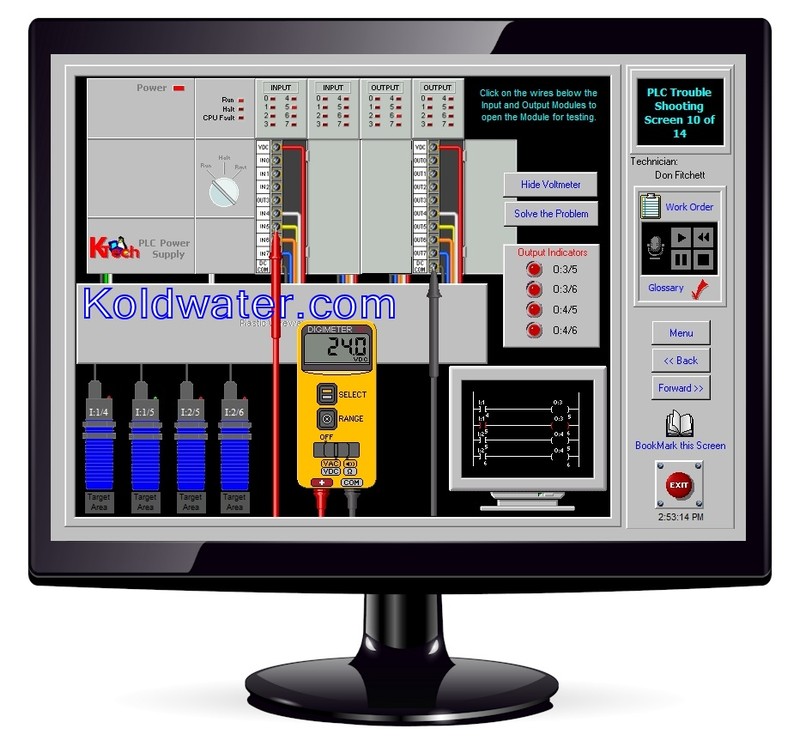
Investigate simulated system behavior and relate the symptoms to the ladder logic.
 Enlarge ↗
Read the work order, consider the reported problem, and use the course exercise to investigate.
 Enlarge ↗
Explore FRD and TOD instructions through examples involving thumbwheel data and numeric conversion.
 Enlarge ↗
Follow FIFO load and unload operations to understand how ordered data moves through a file.
 Enlarge ↗
Use the BSL example to connect a shift-register instruction with changes in the data.
FROM A PLCTRAINER LEARNER
“My understanding of the instruction set for our 5/04 processors is so much better now. Troubleshooting is easier because I can look at the logic in monitor mode and actually understand what’s supposed to happen.”
Chuck Pheiffer · Maintenance Mechanic
BEFORE YOU BEGIN
No. PLCTrainer uses RSLogix-style examples but does not include Rockwell RSLogix 500. You can optionally select the course with the separate PLCLogix 500 training simulator in the purchase menu.
No. The installed course uses a perpetual license with no subscription or course expiration date.
No. PLCTrainer includes built-in interactive simulations. The separate PLCLogix 500 simulator and the extra laboratory exercises are optional practice resources, not requirements for completing the course or earning the certificate.
Yes. The supplied Windows course lists compatibility with Windows 11, Windows 10, and Windows XP.
Yes. Download and activation instructions are emailed within 24 hours of purchase. Once installed and activated, the Windows course supports offline self-study.
Yes. Lessons cover analog inputs and outputs, mathematical relationships, and scaling examples using SCL and SCP instructions.
Yes. The course includes interactive troubleshooting exercises with realistic work orders so you can investigate simulated system problems.
Yes. It starts with PLC foundations and progresses through instructions, analog I/O, and troubleshooting. Familiarity with electrical and motor control basics is helpful.
The examples use Allen-Bradley-style ladder logic and screens with the look and feel of RSLogix 500. The course also teaches general PLC concepts. Instructions and tools vary between controller families.
Yes. Learners operate built-in simulations and explore instruction behavior within the course software. A physical PLC is not required.
PLC study can complement IT experience, particularly in networking and data handling. Industrial roles also require knowledge of equipment, electrical systems, and safe work practices. Job requirements and opportunities vary by employer.
Choose the controller family used by your employer or target industry. Learning ladder logic, I/O, and troubleshooting concepts provides a foundation, then you can study the specific hardware and software used at that site.
Review ladder logic, I/O, timers, counters, and a structured approach to fault finding. Be ready to explain your reasoning and experience. Interview topics depend on the position and equipment involved.
A fault indication is a starting point for diagnosis, not a diagnosis itself. Read the model-specific fault code and documentation, then follow the site’s authorized troubleshooting procedures. Do not clear a fault or change a running system without understanding the cause and consequences.
An upload generally copies the controller’s program to the programming computer; a download transfers a project to the controller. Use the correct software and model-specific procedure, with authorization and appropriate backups. A download can change machine behavior.
Memory-related faults depend on the controller model and its storage design. Power conditions, backup batteries where fitted, and hardware problems may be relevant. Use the actual fault information and manufacturer documentation to diagnose the cause.
Use a structured sequence of lessons, practice with simulations, and review why each instruction behaves as it does. PLCTrainer combines explanations and interactive examples, with a laboratory manual for additional practice.
PLCTrainer provides about 30 hours of self-paced study. Your pace depends on experience and how much time you spend repeating examples and completing optional exercises. Developing practical workplace proficiency takes further experience.
No engineering degree is required to begin learning PLC concepts. Employment qualifications vary by role and employer; many learners come from electrical, maintenance, or technical training backgrounds.
PLCs are used across manufacturing, packaging, material handling, food processing, utilities, and many other automated operations. The controllers and programming tools used vary by facility.
No. The included PDF lab manual is intended for instructors to use in class and as handouts. Individual learners can also use it as optional extra learning material. It is not required to pass the course.
Return to the license selector to view pricing and place your order.
Go to Purchase ↑KEEP BUILDING YOUR SKILLS