Diagrams & relay logic
- Wiring diagrams vs. ladder diagrams
- Ladder diagram logic and basic rules
- Solenoids
- Electromechanical relays
- Introduction to timers
- Control applications
MCTRAINER · INTERACTIVE WINDOWS SOFTWARE
Connect the diagram to the equipment.
Move beyond memorizing symbols. Explore narrated lessons and interactive circuit examples that connect switches, relays, timers, and motors to the diagrams you work with.
Self-paced study Offline Windows software Perpetual license, no subscription
WHAT THE COURSE TEACHES
CHOOSE YOUR MCTRAINER LICENSE
Select a Student or Site License below to see its price and add MCTrainer to your cart. For multiple locations, request an Enterprise License quote.
Your order will be processed by our parent company, Business Industrial Network (BIN95.com). Download/activation information is emailed within 24 hours for digital versions.
License Types:
Student License – 1 learner may take the course.
Site License – Unlimited installs at a single physical location.
Enterprise License – Unlimited Site Licenses across multiple locations. (Request Quote)
Site and Enterprise licenses include a mini LMS for progress tracking.
The Constructor mentioned in the laboratory manual is optional, sold separately, and not required. Questions? support@koldwater.com · 702-625-7715
INTERACTIVE, NARRATED SELF-STUDY
Designed for electricians, maintenance technicians, and students learning industrial relay controls. Follow the lesson explanations, operate the interactive examples, and return to any topic when you need a refresher.
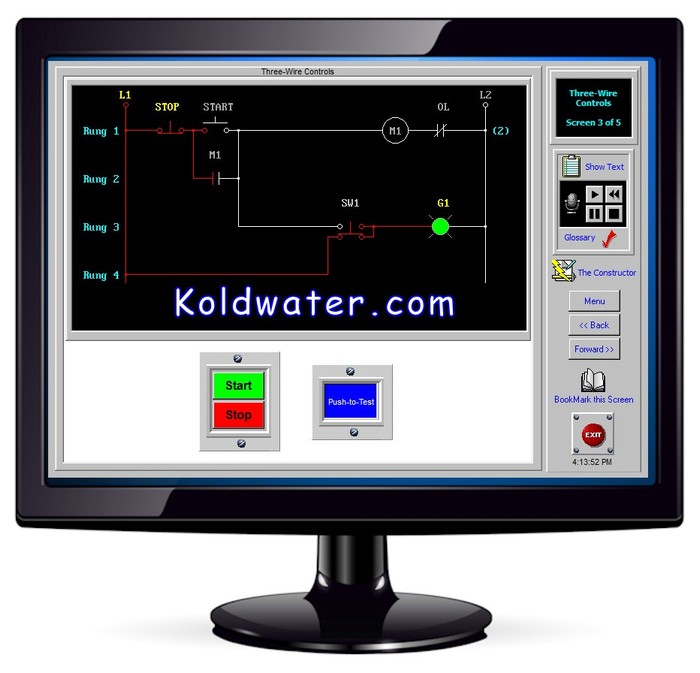
Relate wiring diagrams to ladder diagrams, electrical symbols, and the devices in a control circuit.
Explore simulated devices and watch circuit states respond to your interaction inside MCTrainer.
Repeat narrated lessons, optionally use the laboratory manual, and check your understanding with the final exam.
The included PDF lab manual is intended for instructors to use in class and as handouts. Individual learners can also use it as optional extra learning material. The lab manual is not required to pass the course.
Audio narration · Readable lesson text · Bookmarking · Optional PDF laboratory manual · Interactive final exam · Printable certificate at 85% or better
Site and Enterprise licenses also provide a password-protected student log file and printable test responses for training oversight.
LOOK INSIDE
The preview shows the actual software in use. Inside the course, you control the pace, repeat examples, and follow the narrated explanations.
Lessons progress from relay logic and component operation to starting, sequencing, reversing, jogging, and stopping motors.
Watch MCTrainer in use before choosing your license.
ACTUAL COURSE SCREENS
 Enlarge ↗
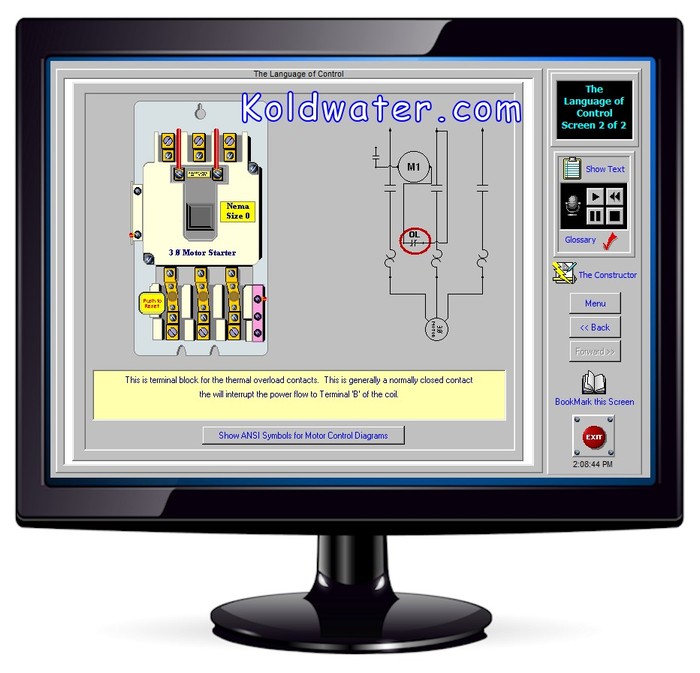
Compare wiring layouts with ladder diagrams and relate symbols to physical components.
Enlarge ↗Review the circuit interactions as often as you need, with narration and readable lesson text.
 Enlarge ↗
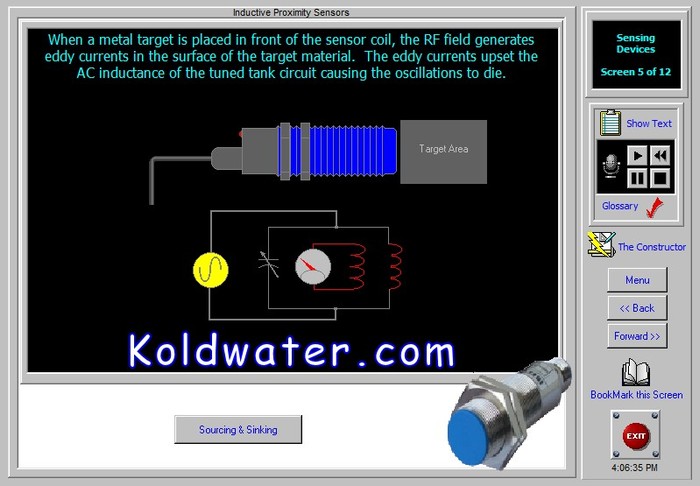
Use the course’s drag-and-drop interactions to explore sensing devices and their effect on motor controls.
 Enlarge ↗
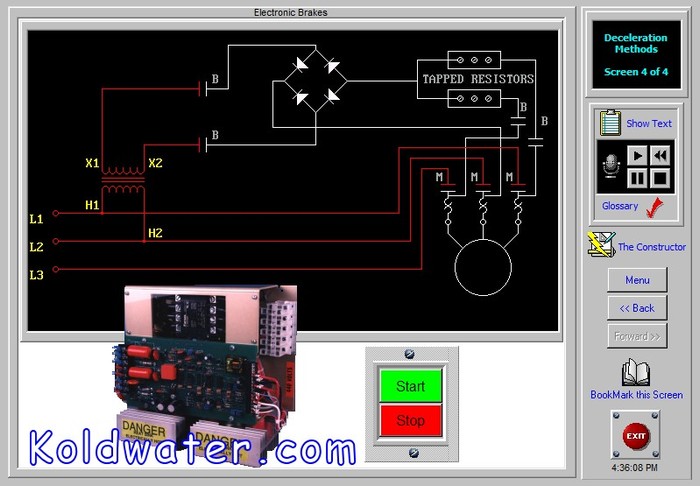
Study electronic AC motor braking alongside the other deceleration methods in the course.
“I have recently purchased the software, MCTrainer, and have found it to be an excellent motor control training program. There is also great product support for any problems you have.”
M. Dixon · Electrician · Knox Creek Coal Co.
BEFORE YOU BEGIN
MCTrainer connects electrical symbols and relay ladder logic with the devices they represent. Interactive examples show how changing an input affects the control circuit, helping you follow the relationship between a wiring diagram and a ladder diagram.
The course covers two-wire, three-wire, separate, hand-off-automatic, sequence, reversing, jogging, and timing relay controls, plus starting and deceleration methods. It also introduces PLCs and VFD motor control.
MCTrainer is downloadable Windows training software for self-paced study, including offline use. It is not a browser-based course. Download and activation information is emailed within 24 hours of ordering.
Audio narration and readable lesson text let you review at your own pace. The course includes an interactive final exam and a printable certificate of completion when you score 85% or better.
A Student License covers one learner. A Site License allows unlimited installations at one physical location. An Enterprise License covers multiple locations. Site and Enterprise licenses include student progress tracking; request a quote for Enterprise licensing.
No. The Constructor software referenced in the MCTrainer laboratory manual is an optional supplemental tool. It is sold separately and is not included or required for MCTrainer.
No. The included PDF lab manual is intended for instructors to use in class and as handouts. Individual learners can also use it as optional extra learning material. It is not required to pass the course.
Return to the license selector to view pricing and place your order.
Go to Purchase ↑KEEP BUILDING YOUR SKILLS