A supported next step for LogixPro users
Koldwater now offers PLCLogix 500 as its replacement for LogixPro. If you already have LogixPro programs for a course or your own practice, PLCLogix 500 can open those .rsl files. You can build on the work you have already done.
For years, we supplied LogixPro as an affordable way to learn ladder logic. We moved to PLCLogix because continuing support matters when a semester is starting or a learner needs help. Our PLCLogix developer partnership allows us to maintain Koldwater’s commitment to reply to customers within 24 hours.
Keep the exercise. Test it in PLCLogix 500.
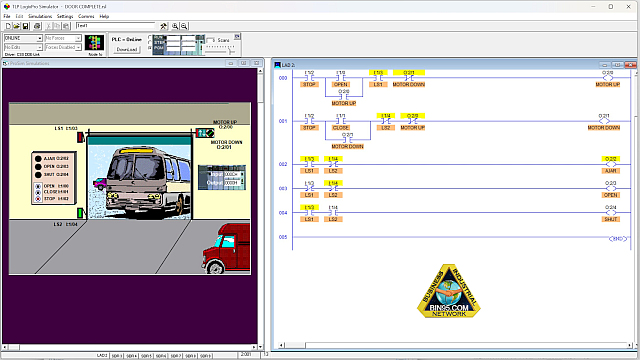
LogixPro™
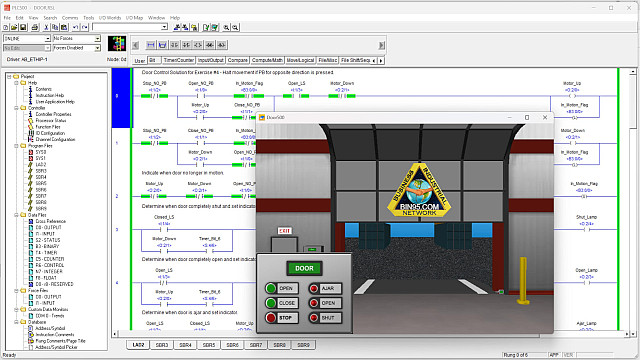
PLCLogix® 500
LogixPro, also known in our earlier course packages as Professor Bill’s LadderLab, gave students an RSLogix 500-style rung editor and ProSim-II process simulations. Students could program a door, conveyor or other process and watch the simulated inputs and outputs respond.
PLCLogix 500 continues that style of practice with file-based addressing, expanded I/O and more detailed process environments. The warehouse door screenshots above show how a familiar exercise carries over.
- Open the original LogixPro .rsl file in PLCLogix 500.
- Test the simulation and check each input and output. Some input states differ between the two simulators.
- Use Save As to save a copy under a new filename to retain the original exercise.
Our illustrated LogixPro conversion guide demonstrates a Stop-button difference and the corresponding ladder instruction change.
More room to develop the lesson
PLCLogix 500 includes 200 prebuilt example programs. After students reproduce a familiar exercise, instructors can use the additional I/O and enhanced control panel to extend it. Students can observe how their rung changes affect the process and practice diagnosing unexpected behavior.
Try the online getting-started PLC programming lessons on our parent site, BIN95.com. You can complete the Getting Started guide and all seven hands-on lessons using PLCLogix 500.
Know whom to contact when you need help
For existing LogixPro activation or licensing questions, reply to your activation email and use the supplier’s website contact information. The Learning Pit (canadu.com) is the LogixPro supplier. Keep your purchase reference and the exact error or demo-mode message handy so it can identify your license and investigate. For LogixPro help in the classroom, here are the updated LogixPro 500 Lessons. Original lessons can be accessed in the LogixPro Help pull-down menu.
For PLCLogix purchased through Koldwater or BIN95, contact our support team. We reply within 24 hours and coordinate with the developer when needed. A prompt response gives you a next step while an issue is being investigated.
When comparing prices, consider both the simulation features and the help available after purchase. For an instructor, being able to reuse class exercises and reach a responsive support team can be worth more than the initial price difference.
LogixPro support and replacement FAQs
Is LogixPro still available from Koldwater?
Koldwater no longer distributes LogixPro. We now offer PLCLogix 500 for RSLogix 500-style ladder logic practice. For current LogixPro availability, check its supplier, The Learning Pit (canadu.com).
How do I get support for an existing LogixPro license?
Start by replying to the email that supplied your LogixPro activation details. Also use the contact information on the supplier’s website, The Learning Pit (canadu.com). Include your order or license reference, the exact message you see and when the problem began. Allow for a response that may take several days. For PLCLogix purchased through Koldwater or our parent company, BIN95, contact our support team. We reply within 24 hours.
What is a good replacement for LogixPro when it is no longer working?
PLCLogix 500 is the replacement we recommend. It opens LogixPro .rsl programs, so instructors can reuse existing ladder logic exercises. Test each program against the PLCLogix simulation’s I/O and save the adapted version as a separate file.
Why should I pay more for PLCLogix 500 than for LogixPro?
The value includes continuing your existing coursework, additional simulation capability and a responsive support contact. PLCLogix 500 provides 65 simulated instructions, 200 prebuilt example programs and expanded I/O. Koldwater and BIN95 reply to support inquiries within 24 hours. That response commitment helps you plan the next step when a question interrupts a class or study session.
Can I open my existing LogixPro .rsl programs in PLCLogix 500?
Yes. Open the .rsl file in PLCLogix 500, test the inputs and outputs, then save a separate copy. The warehouse door exercise illustrates an input-state difference that requires changing a rung. Follow our LogixPro-to-PLCLogix 500 conversion guide for screenshots and the three-step procedure.
Why has my activated LogixPro reverted to demo mode?
The cause needs to be checked with the LogixPro supplier. Keep your activation email and note the exact message, when the change appeared and any recent computer changes. Send those details to the supplier using the activation email or its website contact information. If you need an alternative for class, PLCLogix 500 can open your existing .rsl exercises.
Should I choose PLCLogix 500 or PLCLogix 5000 to replace LogixPro?
Choose PLCLogix 500 when the goal is to reuse LogixPro .rsl exercises and practice file-based RSLogix 500-style addressing. PLCLogix 5000 is for tag-based, RSLogix 5000-style PAC programming.
Do I need a physical PLC to practice with the simulator?
You can write and test ladder logic using the simulated controller and process equipment on your Windows computer. The process window supplies the inputs and shows the outputs in action, allowing you to practice before working with physical equipment.
What is the difference between PLCLogix 500 and the PLC training course?
PLCLogix 500 lets you write and test your own ladder logic programs. The Koldwater PLC training course provides structured instruction and more than 40 built-in interactive simulations. The course and standalone simulator can be used together. Check the PLCLogix 500 product page for current simulator and optional course-bundle choices.
Will a PLCLogix support inquiry be answered within 24 hours?
Yes. Koldwater and BIN95 reply to PLCLogix customer support inquiries within 24 hours. Some issues require investigation or coordination with the developer, so the time needed to resolve the issue will depend on its cause. Use our contact page and include your product, order details and a description of the problem.