Koldwater Training Software
Training for the Electrical and Automation Controls Industry
Koldwater
Training
Software

Koldwater Training Software
Training for the Electrical and Automation Controls Industry
Training
Software
Converting PLC programs from…
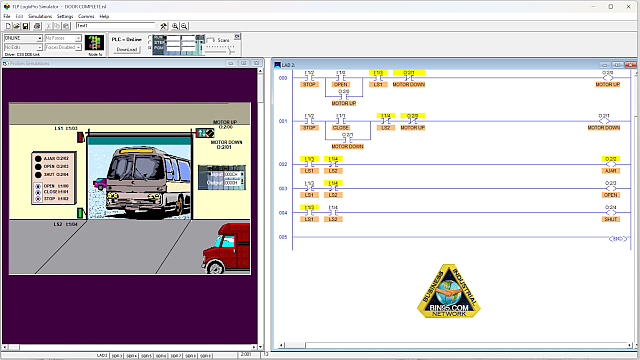
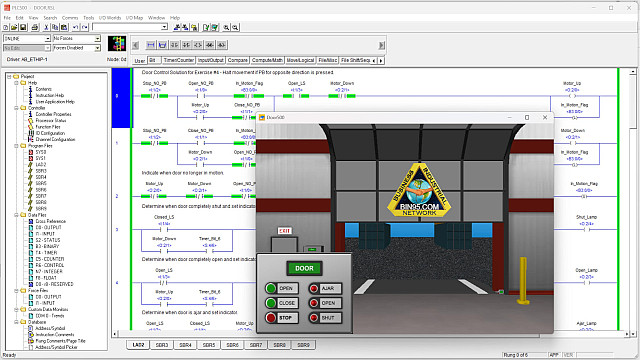
Over the years, many instructors and students have created PLC programs using the LogixPro™ simulator. With the release of the more robust PLCLogix® 500 platform, those programs can be opened and updated directly—no conversion utility required.
This guide walks you through the simple three‑step process for opening, testing, and saving LogixPro *.rsl files in the PLCLogix 500 Simulator, along with practical tips for instructors and lab development.
We'll use the LogixPro™ warehouse door PLC program in these examples.
If PLCLogix® 500 was installed after LogixPro™, Windows will typically automatically associate *.rsl files with the newer simulator. In most cases, you can simply double‑click the file to open it.
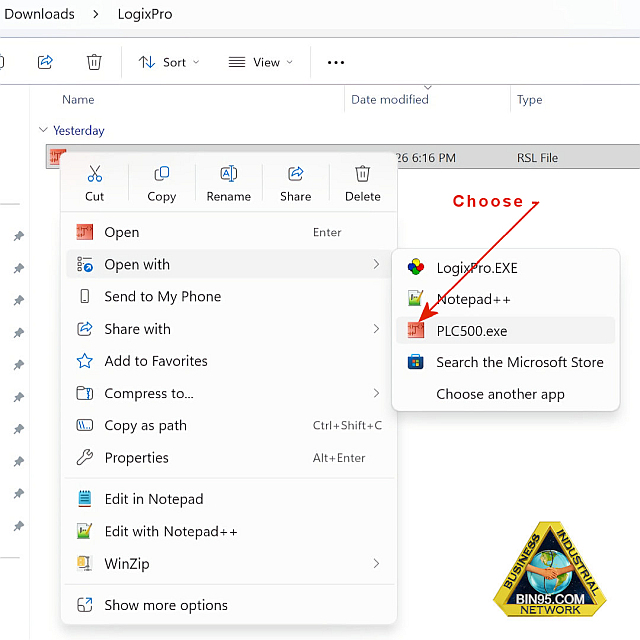
After loading the ladder logic created in RSLogix, run the program in Run mode and verify all functions. Most logic will operate exactly as before, with the exception of a few I/O differences between the two simulators.
For example, in the LogixPro™ warehouse door simulation, the Stop pushbutton is wired as normally closed (NC). In PLCLogix® 500, the Stop push button is normally open (NO).
As a result, the imported instruction for input I:1/2 must be changed from XIC to XIO to match the PLCLogix® 500 hardware model.
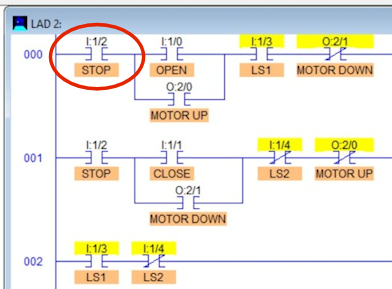
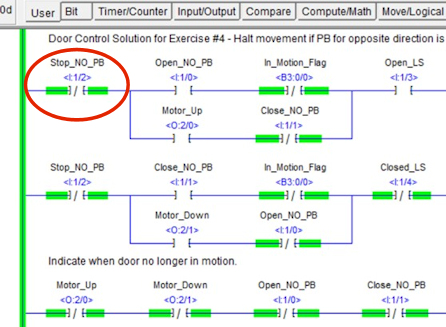
This adjustment takes only a moment—especially if your program includes a cross‑reference subroutine, as recommended as a best‑practice by PLC Training Org.
Instructor Tip: Have students load their old LogixPro™ programs into PLCLogix® 500, identify any I/O differences, and correct the logic. It's an excellent troubleshooting and migration exercise.
Once the program runs correctly in PLCLogix® 500, save it under a new filename (e.g., door_updated.rsl). This preserves the original LogixPro™ version for future reference or comparison.
PLCLogix 500 simulator includes expanded I/O and enhanced control panel functionality not available in LogixPro™. A valuable lab activity is to have students add rungs that take advantage of these additional inputs and outputs.
In addition, PLCLogix® 500 provides more than 200 built-in lab projects, all available offline. These prewritten programs can serve as examples, templates, or guided exercises for students learning ladder logic.
To compare the I/O assignments of two programs:
This allows you to quickly identify differences in addressing or hardware behavior between the two simulators.
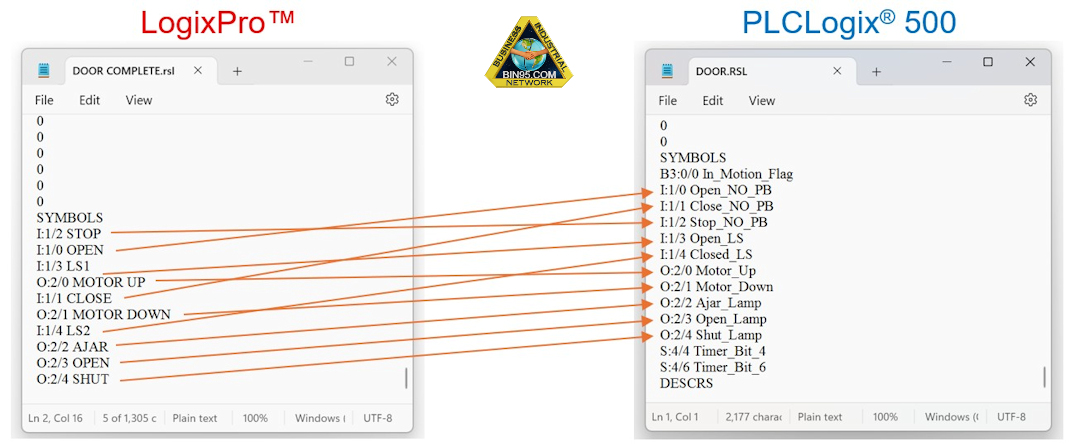
The above information not only outlines how to open, test, and update legacy LogixPro™ programs, but also demonstrates how seamlessly the new PLCLogix® 500 simulator software can be used to complete the PLC exercises found in the instructor lab manual built into our PLC Training course software. By adopting PLCLogix® 500, instructors gain a modern, fully compatible environment for teaching ladder logic and troubleshooting—ensuring students can work through both legacy simulations and the latest lab activities with confidence.
This LogixPro Download Conversion PDF is printable if you prefer it or want to share it with others.

PLCLogix™ 500 simulates the RSLogix 500® and the Rockwell™ Logix 500® PLC.
Also rememember our PLC Training course has 40+ built-in interactive simulations.
