What you’ll learn
- Interlock direction outputs
- Use travel limit inputs
- Control indicator lamps
Recommended prerequisite: Relay logic
Explore the door simulation
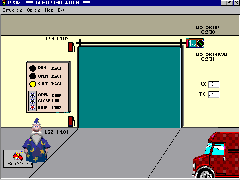
Select Door Simulation. With the door closed, inspect the two limit switches and view input bits I:1/03 and I:1/04 in the Input Table while the simulated PLC is in RUN. Press Stop and observe I:1/02. Establish which states represent each door position before writing logic.

Exercise 1: Hold-to-run motion
Use Open and Close to move the door only while the selected button is held. Stop at the appropriate travel limit, prevent motion beyond either limit, and interlock the two motor direction outputs. Indicate fully open and fully closed positions with the corresponding lamps. Do not use latching instructions in this exercise.
Exercise 2: Maintained motion
Modify the program so motion continues after the initiating button is released. Stop must cancel motion immediately and releasing Stop must not restart it. Preserve the travel limits and direction interlock. Illuminate Ajar when neither end position is reached. Continue using non-latching logic.
Exercise 3: Flashing indicators
Inspect the free-running clock word S:4 in binary. Try S:4/4 with an XIC instruction to flash an indicator; adjust the selected bit if needed for a useful simulation rate. Flash Open while opening and Shut while closing, with steady lamps at their respective end positions. Make Ajar steady during motion and flash at one quarter of the other lamps’ rate when stopped between limits.
Exercise 4: Prevent immediate reversal
An opposite-direction request must stop motion, not reverse it. Require all buttons to be released before accepting a fresh motion request. Consider a ready flag such as B3:0/0; OTL and OTU may be used in this exercise. Document and test all four programs.
Discussion: Limit switch wiring
Compare the simulated normally open limit-switch arrangement with alternatives that produce a false input at either travel limit. Explain how an open wire or a short could affect motion and stopping. These are simulator exercises, not a safety-rated design for real powered doors.
Lesson FAQs
How can I prevent simulated door motor burnout?
Interlock the open and close commands and prevent immediate reversal as required by the exercise.
Why does the door keep moving at a limit?
Check the limit input state and verify the corresponding instruction interrupts the motion rung.